Electronic Yellow Sticky of Doom

The previous post looked at written passwords – let’s now look at electronic passwords:

Instead of writing passwords on a piece of paper, you can save them on the computer. The most obvious way to do this is with a text document or a spreadsheet.

Bad idea!

Your password is now subject to being hacked. Since your computer is almost certainly connected to the network (or you wouldn’t have so many passwords!), you are now threatened by the entire Internet, not just the people around you.

OK, you can save the document or spreadsheet as a password protected document. Less bad, still not good. It is a step in the right direction, but there are better ways to do it. This is a situation where you should use the right tool for the job – in this case a password manager.

A password manager is an application designed to manage your passwords. It will typically have a strong security model, the ability to organize passwords by the application or web site they go to, and the ability to generate passwords. Many password managers are designed to integrate with applications and the Web, where they can automatically provide the username and password and login for you.

Instead of trying to remember multiple passwords, all you have to do is remember a single password to open the password manager. (Yes, you can write down the password to your password manager. In fact, you probably should – and lock it up in a secure location like a safety deposit box. Think of this written copy as a backup, where security is more important than ease of access. You may even want to print out the contents of your password manager and lock them up in the safety deposit box.)

There are many password managers available, so you should do your research before choosing one. Reviews are available from a number of sources such as LWN  or Tech Radar. Be especially careful when choosing a password manager from an application store that has millions of applications – many of these applications are poorly written and may contain malware. For something as important as a password manager you need to do your homework!

An example of a highly regarded password manager is KeePass and the KeePassX version for Linux. This is an open source application, so the code has been widely reviewed. If you are running Linux, KeePassX is probably included in your Linux distribution.

KeePass creates an encrypted database of passwords on your system. In fact, it supports multiple databases, so you can keep personal and work related passwords separated. KeePass also has an internal group structure to organize passwords. This allows you to to have groups like finance, social, sports, email, and work for your various accounts.

A strength of password managers is that most of them have a password generator. Again looking at KeePass as a specific example, you can control the length of the password, uppercase/lower case, numbers, special characters, and even whitespace. You also have the option of specifying “pronounceable” passwords.(For some values of pronounceable…)

Using a password manager makes it feasible to use more secure passwords – specifying 24 characters, uppercase/lowercase/numbers/special characters and generating a unique password for each application or site is easy. It is also easy to change passwords regularly – just have your password manager generate a new password, which it then remembers.

Password managers aren’t perfect, but they are a useful tool for making passwords as good as they can be. Using a good password manager is more secure than re-using an easily guessable password across multiple applications.

Next: Yellow Sticky of Doom in the Cloud

Posted in Security | Leave a comment

Yellow Sticky of Doom Revisited

Our last post introduced The Yellow Sticky of Doom.

Talking with security experts about the Yellow Sticky of Doom shows that the situation isn’t entirely bleak. They agree that posting notes on a monitor – or the bottom of a keyboard – is bad.

However, they recognize that (somewhat secure) passwords are difficult to remember and will be written down. They point out that combining written passwords with physical security can actually be a reasonable approach.

If you write your password down and place it in a locked desk drawer you achieve a significant level of security. Getting the password out of sight is a good start – rifling through someones desk drawer is usually noticed. And if you lock your desk when you leave you are establishing a reasonable level of commercial security. And the good news about desk drawers is that they can’t be accessed through the Internet!

This approach assumes that you have a reasonable level of physical security for your business or home. If you don’t, password security may be the least of your concerns.

There are a variety of ways to increase physical security, such as control of keys, using secure filing cabinets, or using a safe. Something as simple as a Locking Bar for 4 Drawer File provides significantly enhanced physical security beyond that of common desk locks.

This is an area where you need to look at security from a higher level. Once you recognize that passwords by themselves provide poor security and that passwords will be written down you can develop a rational approach. Consider computers, networks, people, policies, and physical security together – develop a real security policy, rather than passing down edicts that don’t work.

You can’t abolish the Yellow Stick of Doom. But moving it into a locked desk drawer is probably good enough.

Next: Electronic Yellow Sticky of Doom

Posted in Security | Leave a comment

Greatest Threat: Yellow Sticky of Doom

The previous post looked at man-made physical threats.

We now get to what I consider the greatest threat to computer security: the Yellow Sticky of Doom!

Yellow Sticky

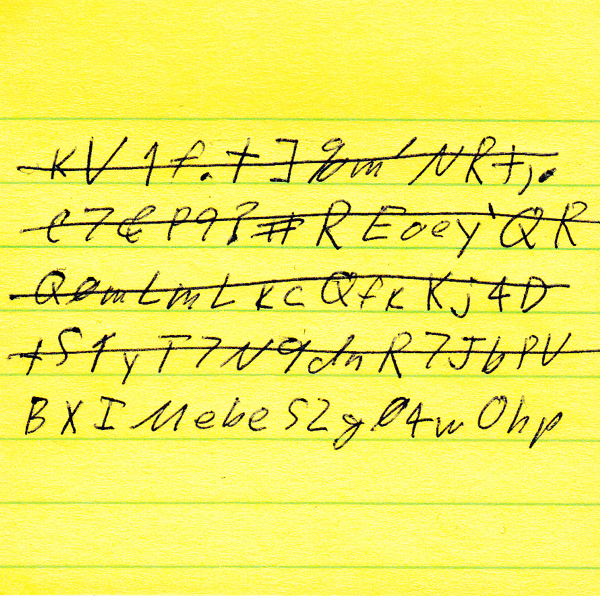
Passwords written down on yellow sticky notes. These are everywhere.

What is the difference between a secure facility and an insecure facility? In an insecure facility the yellow sticky notes are stuck to monitors. In a secure facility the yellow sticky notes are stuck to the bottom of the keyboard. In really secure facilities they are in desk drawers – and maybe even locked up!

The solution is obvious: ban people from writing down their passwords!

Except that this won’t work. Full stop. Period. Won’t. Work.

Why? Because passwords are crap for security.

Passwords that are difficult to guess or to crack with a brute force attack are impossible for people to remember – look at the ones in the yellow sticky above! All of these passwords were produced by a password generator with a high security setting. Anyone who can remember one of these passwords scares me!

Consider the usual guidelines for producing a secure password: 12-16 characters, no dictionary words, a combination of upper case, lower case, numbers, and punctuation. And changed every 1-6 months.

Right….

Human brains don’t work this way.

Correct Horse Battery Staple

If you want people to actually remember passwords, consider the way the human brain works. Look at XKCD on Password Strength: this is an example of a password that a human can remember. It builds on the way the mind and memory work, through chunking, context, and pattern recognition. Correct Horse Battery Staple has become an Internet meme – a code term referencing a way to make passwords somewhat work.

But, can your system handle it? Do you allow passwords this long? Do you allow spaces in passwords?

And look at your policies. If a person can remember a word, it is in a dictionary! The only thing a “no dictionary words” policy does is guarantee that passwords will be written down.

At a minimum, encourage pass phrases rather than classical passwords.

If you actually care about security, implement multi-factor authentication – a combination of what you know, what you have, and what you are.

Traditional passwords serve only one purpose – to allow you to blame innocent users for your mistakes. They are no longer an effective security or authentication mechanism. Forget trying to stop people from writing them down and get serious about security.

Get rid of the Yellow Sticky of Doom by making it obsolete!

Next: Yellow Sticky of Doom Revisited

Posted in Security | 5 Comments

Threat: Joe the Backhoe Operator

The previous post considered forces of nature – we also have man-made threats:

BackhoeSmall

Where Dennis the Weatherman is a proxy for all the threats nature can pose, Joe the Backhoe Operator is a proxy for man-made threats outside the data center.

Backhoe Fade is a familiar term in the telecommunications industry, where it refers to construction activities cutting cables. This can be anything from a single network link to a major fibre optic link affecting millions of people. The classic example is a backhoe operator digging in a field in the middle of nowhere who digs right through a cable, taking out a major telecommunications link.

Closely related to backhoe fade is damage to undersea cables, often from ships dragging anchors across the cables and severing them. And, of course, sharks… How Google Stops Sharks From Eating Undersea Cables

While not necessarily a classical security threat, and not a threat to system integrity in the same way as other threats we have discussed, backhoe fade is a great threat to system availability and business continuity.

Major data centers will typically have multiple redundant, physically separated network connections to allow them to route around network failures.

Unfortunately, it is much less common for individual buildings where people actually work to have such redundant network connections. If the hundreds of people in your office can’t get to the corporate data systems, it really doesn’t matter which end of the cable has been cut…

Next: Greatest Threat: Yellow Sticky of Doom

Posted in Security | Leave a comment

Threat: Dennis the Weatherman

We last looked at an inside threat – now let’s consider some external threats:

HurricaneSandy

Dennis the Weatherman is a proxy for the threats that nature presents. Superstorm Sandy is a recent example of the power of weather. Some places received over a half meter of rain in less than 24 hours, as well as high winds. The combination of flooding, storm surge, high winds and downed trees wreaked havoc on businesses and data centers over an extended area.

Superstorm Sandy highlighted many factors around disaster preparedness. Some companies were able to fail over to geographically remote data centers and continue operations with minimal disruption.

Some companies had mixed experiences. One of the best examples is Peer 1 Hosting – their data center was well above the flooding and they had backup generators. Unfortunately, their diesel fuel tanks for the backup generators were in the basement… They had to form a “bucket brigade” to carry diesel fuel up 17 flights of stairs.

Other companies were simply down. Without power or network connectivity there was nothing they could do. Worse, their datacenters may have been flooded and the equipment damaged or destroyed. Worst case would be a flooded datacenter without adequate offsite disaster recovery or even backups; some companies went out of business.

In addition to hurricanes, you have to worry about flooding, tornadoes, fire and wildfire, blizzards, and earthquakes.

The good news is that the computer systems in the basement of a flooded data center which is burning down in the middle of an earthquake are not likely to be hacked…

Yes, weather is a clear and present danger to system integrity. Plan accordingly. PLAN accordingly! Exactly what will you do if your data center is under water and located in the middle of an entire region of downed trees with roads blocked by thousands of people trying to escape. And maybe even Starbucks closed!

Next: Threat: Joe the Backhoe Operator

Posted in Security | Leave a comment

Threat: Dave the Service Technician

The previous post looked at users and the unintentional threats they can create. Now let’s get hands-on with the systems:

ComputerServiceSmall

Dave is responsible for adding, upgrading and repairing systems. Without Dave, things will quickly go downhill in your data center.

While Dave is responsible for maintaining system integrity, he can also compromise it:

  • A drive has failed in a RAID5 set. You need to replace the failed drive and rebuild the RAID. Oops! Pulled the wrong drive. The RAID set has gone from degraded to dead. Time for a recovery operation!
  • Server17 in a rack of 36 1U “pizza box” servers needs to be power cycled. Dave hits the power button on Server18…
  • There is a short circuit in power distribution unit in the server rack. Now you have 36 systems down!
  • Dave moves the wrong network cable in the wiring closet.
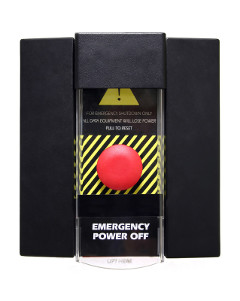
  • Don’t even think about what happens if Dave slips and bumps the Big Red Button!

EmergencyPowerOff

And if Dave happens to be malevolent, he can do things like:

  • Slip a laptop or other small computer into the wiring closet and have it snoop the internal network for data.
  • Connect internal networks directly to the Internet.
  • Steal parts, supplies, and even complete systems. Look at the number of cases where good boards are replaced and then sold on Ebay…

Basically, Dave is a proxy for all of the physical threats to system integrity that can occur in the data center.

Next: Threat: Dennis the Weatherman

Posted in Security | Leave a comment

Threat: Sally the User

SallyUser

Unlike Sam the Disgruntled Employee from our last post, Sally doesn’t have an evil bone in her body. She is dedicated, hardworking, helpful, and committed to doing a good job.

Unfortunately, she doesn’t completely understand how the system works, and sometimes enters incorrect data.

Actually, this isn’t her fault – Tom the Programmer from a few posts back probably didn’t write a usable system! I’m convinced that “Enterprise Software” means software that is hideously expensive with a poor user interface that no one would voluntarily use. I often use the phrase as user friendly as a rabid weasel to describe software, and much of the mission critical software that companies run on meets this description. But, that is a digression – let’s get back to the main point.

Since Sally is helpful and considerate, she is likely to give Fred the System Administrator her password when he calls. This isn’t just a Sally issue; virtually everyone is vulnerable to social engineering; look at the success of spear phishing against senior executives.

Sally is also likely to let Sam the Disgruntled Employee use her system if he asks with a plausible reason.

Sally is representative of the majority of people in your company. She works hard and wants to do the right thing. The systems – both computer systems and corporate procedures – need to support her in getting her job done, be resistant to mistakes, and prevent malevolent entities from using her as an attack vector. This will be a combination of training, system design, software design, management, operations, and company policies and procedures.

Basically, systems need to be designed to help Sally succeed and help prevent her from failing. This is the last place to use a heavy handed blame the employee for everything policy – it is both counter-productive and ineffective.

To be blunt, the problems you have with Sally are system failures, not user failures – the system isn’t designed to be used by typical users in the real world. In many cases the security model is much like the old physics approach of simplifying things to make it easier to deal with, where a problem statement will begin with: “Postulating a spherical cow in a vacuum, what is the trajectory…”

Unfortunately, such idealizations fall apart when real world factors come into play!

Next: Threat: Dave the Service Technician

Posted in Security | Leave a comment

Threat: Sam the Disgruntled Employee

The last post looked at programmers. Now let’s consider another active threat:


SamDisgruntled

I’m going to assert that Sam is the second greatest security you face. (We will encounter the greatest thread in a few more posts.) Depending on who you talk to, between 60% and 90% of corporate losses due to theft and fraud and from employees, not external threats.

This may be overstated in some areas; a lot of credit card theft and identify theft is external. See, for example, the theft of over 50M credit cards numbers at Target. Still, much of the real world theft is internal.

Sam is unhappy with your company. He wants to take from it or cause hurt. Sam may be committing fraud, copying internal documents to take to a competitor, posting damaging information on the Internet, or walking out the door in the evening with a bag full of your products or supplies.

You need to both watch for disgruntled employees and to minimize the damage they can do. Good management and good internal controls are your first line of defense. Constant awareness and vigilance are called for.

Above all, watch the people side. In some cases Sam is simply unethical – you need to find him and remove him. In other cases he is angry – this is often a management issue. In many cases he simply sees an opportunity that he can’t resist; solid internal controls will minimize this risk.

In any case, be aware that your greatest threats are usually inside your company, not outside of it!

Next: Threat: Sally the User

Posted in Security | 2 Comments

Threat: Tom the Programmer

The previous article explored the threat system administrators pose; now let’s look at another internal threat:

TomProgrammer

No discussion of system integrity and security would be complete without Tom.

Without the applications, tools, and utilities that Tom writes, computers would be nothing but expensive space heaters. Software, especially applications software, is the reason computers exist.

Tom is a risk because of the mistakes that he might make – mistakes that can crash an application or even an entire system, mistakes that can corrupt or lose data, and logic errors that can produce erroneous results.

Today, most large applications are actually groups of specialized applications working together. The classic example is three tier applications which include a database tier, a business logic tier, and a presentation tier. Each tier is commonly run on a different machine. The presentation and business logic tiers are commonly replicated for performance, and the database tier is often configured with fail-over for high availability. Thus, you add complex communications  between these application components as well as the challenge of developing and upgrading each component. It isn’t surprising that problems can arise! Building and maintaining these applications is much more challenging than a single application on a single system.

Tom is also a risk because of the things he can do deliberately – add money to his bank account, upload credit card data to a foreign system, steal passwords and user identity, and a wide range of other “interesting” things.

If Tom works for you, look for integrity as well as technical skills.

Be aware that behind every software package is a programmer or a team of programmers. They are like fire – they can do great good or great damage. And, like fire, it is easy to overlook them until something bad happens.

Next: Threat: Sam the Disgruntled Employee

Posted in Security | Leave a comment

Threat: Fred the System Administrator

We last looked at the threat of a manager determined to make the business succeed; now let’s consider an inside threat:

FredSysadmin

In terms of threat potential, Fred is off the charts. In order to do his job, he has essentially uncontrolled access to all computer resources. Fred can damage software and data in obvious or subtle ways. He can wipe out users, steal data, and wreak almost unimaginable carnage.

Fortunately, the vast majority of system administrators are conscientious, professional and honest. They are a force for good, committed to keeping systems running smoothly, data protected, and users productive.

Fred is a risk to system integrity in two ways – accidentally and deliberately.

Most of the time, the greatest threat from Fred is that he doesn’t have the resources he needs to do his job or that his hands are tied by management edicts. These factors can cause system administrators to do (or not do) things that threaten system integrity and security. If Fred is denied budget for proper backups, data is at risk. If Fred is ordered to punch a hole through the firewall to allow sales people access to the orders database, without VPN and proper authentication, systems are at risk. If Fred is ordered to allow contractors access to internal networks – see the Target case – the entire network can be exposed.

In the Target case it isn’t clear if the issue was do to a network design problem or if there were orders to provide this access. This would be interesting to know.

If Fred does go bad, there is almost no limit to the damage he can do. Even if he doesn’t compromise systems he can commit identity or credit card theft or steal company – or even national – confidential data. I don’t think I have to do more than mention the name Edward Snowden…

A number of things can be done to mitigate the threats that Fred presents:

  • Recruit and hire system administrators carefully! Look for proof of integrity as well as technical skills.
  • Ensure that your sysadmins have the training, resources and management support to do their jobs.
  • “Trust but verify.” Have regular system audits. Ensure that system access and changes are logged to a secure remote logging server. Look at the log files! Apply technology, process, and people to maintaining the integrity of system management.
  • Divide responsibilities. Large companies will have separate organizations responsible for systems, networks, storage and applications. Divide up the work and accountability to address both functional and system integrity needs.
  • Focus on detection, mitigation and remediation more than prevention. Go talk to your colleagues in Finance – they have hundreds of years of experience working with high value systems.  You will be surprised at what you can learn from them. They have evolved a model that is designed to prevent theft and misuse where possible, to detect it when it does occur, and to minimize losses. They are aware that you can’t stop everything while keeping the business going – but you should be able to minimize losses and to discover things eventually. Find out how they do policies and procedures, the ethical and business guidelines they follow, how they implement internal controls, and how they balance risk and cost. Hint: it isn’t worthwhile spending $10,000 to stop $20 in losses. But if someone is stealing $10 here and $10 there, you want to find out about it before it grows.

Next: Threat: Tom the Programmer


Posted in Security | Leave a comment