
OpenLMI vs. Puppet

A common question is “what is the difference between OpenLMI and a configuration management system like Puppet or Chef?” This is often asked with the implication that these are competitive approaches and you don’t need both. The two approaches are quite different, and actually complementary to each other.

OpenLMI is built on a model of interactive query, modify, and notify against a single system. It provides a standardized API for various subsystems, which will grow over time. OpenLMI also supports a variety of client applications and interfaces, including an API plus task focused scripting, CLI, and graphical interfaces.

Puppet, on the other hand, uses a special language to create recipes which put systems into a known configuration. Puppet is also idempotent, meaning that you can run the same configuration multiple times with the same result. With Puppet, you specify the outcome, and Puppet has the responsibility of getting there.

The difference between these approaches can be seen with some examples.

Let’s assume that we are bringing up a new server. This new system has 9 disk drives, 4 NICs, and needs to be set up to use AD for authentication. Using OpenLMI, you can interactively enumerate all the drives on the system (including the one that contains the OS), identify the 8 that are available, partition them, combine them into a RAID 5, format them with XFS, and configure volume groups on them. You can then take the four NICs, configure them with IP, netmask, and dns, bond two of them together for performance, and set up VLANs. You can then add the software for AD support (realmd) and add the system to an AD domain.

Yes, you could perform most of these operations using Puppet. But you would need to know the details of the system configuration and create the appropriate recipe. If you have 10 or 100 identical systems, that would be the way to go. If you have 10 different servers with different configurations it is easier to set them up one at a time.

On the other hand, if you have 100 database servers and you want to protect them by disallowing incoming http traffic, it would make sense to create a Puppet recipe to configure the firewall to block incoming traffic on port 80 on all database servers. If you were using Puppet, you would probably have your entire firewall configuration in a Puppet recipe; you would modify this recipe with the desired changes and allow it to automatically propagate across all targeted systems.

You could also do the firewall changes in OpenLMI by creating a script in lmishell to change the firewall rules and remotely running this OpenLMI script against all the database servers.

It should be possible to combine Puppet and OpenLMI. The core of OpenLMI is a set of agents which operate on the managed systems and present a standard interface. Puppet requires agents on the managed systems to make changes. We aren’t aware of anything that would prevent you from writing Puppet agents which call the OpenLMI agents to do the actual work; this would give you the best of both worlds.
Posted in System Management | 4 Comments

Configuring SSL Certificates for OpenLMI

Managing systems with OpenLMI requires authentication at two levels: First, all communications between managed systems and client systems must go over a secure connection. Second, valid account login information must be presented to the managed system to perform operations using OpenLMI.

OpenLMI uses the OpenPegasus CIMOM to talk to client applications and tools.

The protocol used by OpenLMI is called WBEM (Web-Based Enterprise Management) and functions over an HTTP transport layer. In order to authenticate this connection, standard HTTP “Basic” authentication is performed, which means that the username and password are transmitted alongside the requests. Because of the high-level of access that OpenLMI is granted on the managed system, it is very important to ensure that these credentials are not exposed. In order to do this, we configure the OpenPegasus CIMOM to use HTTPS for communication, thereby wrapping the requests in an encrypted channel and preserving the secrecy of the username and password. This approach requires provisioning an SSL certificate on the managed system to establish this trusted tunnel.

Instructions for doing this have been published at http://www.openlmi.org/PegasusSSL. The guide covers using both self-signed certificates as well as certificates signed by a Certificate Authority. Wherever possible we recommend managing certificates with a domain controller like FreeIPA.

Management level access to a system has to be carefully controlled, so make sure your SSL/TLS certificates are properly configured and managed!

Posted in System Management | Leave a comment

Discovering Systems that can be Managed with OpenLMI

One of the challenges of remote system management is knowing what systems you are managing and what the supported capabilities of each system are. The brute force way to do this is to keep a list of systems – a labor intensive and error prone approach! Or, you could ask all systems to identify themselves if they have management software installed.

This approach is called discovery and is implemented in OpenLMI using SLP (Service Location Protocol). SLP is s an Internet Engineering Task Force (IETF) standards track protocol that provides a framework to allow networking applications to discover the existence, location, and configuration of networked services in enterprise networks.

To use SLP you need to install and configure an SLP Client on all discoverable systems. An SLP Server issues a network broadcast packet asking for specific services. All systems that have that service will respond, including details on the services that they have.

The OpenPegasus CIMOM is integrated with OpenSLP. This means that you can find systems that can be managed by OpenLMI by issuing a command like slptool findsrvs service:wbem. This command will return a list of the servers running OpenLMI and the ports they are using.

You can then either connect to the desired server and perform management operations or you can ask for more information, such as the OpenLMI profiles installed on a specific system.

System discovery is a powerful tool, especially in large environments. More information on using SLP with OpenLMI is available at http://www.openlmi.org/SLPDiscovery.

Posted in System Management | Leave a comment

OpenLMI Meeting on IRC

Stephen Gallagher of Red Hat is organizing a weekly IRC meeting on OpenLMI. The goal of this meeting is to discuss planning and status of various OpenLMI projects, with a higher bandwidth than the OpenLMI mailing lists.

The IRC meetings provide an opportunity to ask questions, share what you are working on, and keep track of developments in the Linux manageability space. It is open to everyone – it doesn’t matter what distribution or component you are interested in, you are welcome to join.

The meeting will be every Monday at 9:00am EDT/ 13:00UTC at #openlmi on irc.freenode.net, starting on October 21, 2013.

The companion to IRC is the OpenLMI mailing list at https://lists.fedorahosted.org/mailman/listinfo/openlmi-devel – anyone involved in OpenLMI development should be on that list.

Finally, the OpenLMI web site at www.openlmi.org continues to be actively updated. Recent additions include new Agents, much more documentation on lmishell scripts and commands, and guides to configuring SSL and using OpenSLP for discovery.

Posted in System Management | 1 Comment

New OpenLMI Website

We’ve been working on a new OpenLMI website for the last couple of months, and it is now live at www.openlmi.org. This is our new community site and is intended to be more friendly than the old site. Please take a look at it and let us know what you think!

Our goals were to provide more information, to make it accessible through improved navigation menus, and to divide the information up functionally with separate tabs for Using OpenLMI, system architecture and infrastructure, available agents, and developing new agents.

To get an idea of where we are going, take a look at the storage agent at http://www.openlmi.org/agent_storage. This shows the kind of information we want to present for each of the agents. In fact, there is more – we are working on some dynamite user documentation that will show up in the next week or so.

This is a living site. It is built on a CMS so that it can easily be updated and extended. You may find a placeholder page or two; we are actively working on new content. And we would like to engage in discussions with you.

Whether you are interested in learning more about OpenLMI, obtaining and installing it, or becoming actively involved with OpenLMI development, the new OpenLMI website is the place to go.

(I should mention that the old site hasn’t gone away. It is still available at https://fedorahosted.org/openlmi/. This is the hardcore developer site which contains our ticketing system for bugfixes and enhancements. We will continue to use the old site for these purposes.)

Posted in System Management | 2 Comments

OpenLMI Networking

The networking support in OpenLMI is designed to configure and manage multiple NICs on a server. A representative configuration would be a server with a NIC on the motherboard which is used for management functions and a quad (four port) GbE or 10 GbE NIC for network and storage traffic.

Let’s look at configuring such a server, where we have a management NIC and a quad GbE NIC that we want to configure with two bonded ports on one subnet for network traffic and two ports on a different subnet used for storage traffic.

A typical workflow for configuring such a network would be:

  • Connect to the managed server through the management network. Note that if you are connecting to the system it means that this NIC is already configured. You usually avoid making changes to the management network, as it is easy to make the system unreachable.

  • Enumerate network devices. This gives you a listing of the network devices and some key information like the device name and manufacturer. You can tell which NIC is being used for the management plane and which NIC should be used for production networking traffic.

  • Choose the devices to be used for network traffic.

    • Get the parameters of the network devices (MAC address, link up/down status)

    • Get the current IP configuration for each device (IPv4 and IPv6 addresses, netmask, default gateways, DNS)

    • Make any needed changes. Set the IP address, netmask, dns and gateway for the NICs used for networking This can be either IPv4 or IPv6 addresses..

      • Combine the two NICs into a bond group for increased performance

    • Bring up the networking NICs

  • Choose the devices to be used for storage. Follow the same configuration process as used for the networking devices.

  • You will receive notification about changes in network devices and settings – created, modified, deleted – as you go through the configuration process.

All of this is straightforward and is routinely done as part of server configuration. The difference is that OpenLMI allows you to query and configure the network without interactively logging in to the managed server and either running local tools or editing configuration files.

Further, LMIshell provides a friendly environment for CLI and scripting that makes these tasks even easier. We will cover LMIshell in a future post.

Posted in System Management | Leave a comment

OpenLMI Storage

The OpenLMI Storage Provider configures and manages local and remote storage. For local storage it has the ability to enumerate (discover) and configure devices. The initial release of OpenLMI storage has the ability to configure remote storage but not discover or provision it. This means that remote storage must be provisioned using existing approaches and the resulting lun made available to OpenLMI. Once the remote LUN is made available we can partition, format and mount it. We plan to support provisioning of remote storage in a future release.

The OpenLMI storage model is based on the DMTF SMASH and SMI-S profiles, and has been extended and modified to support Linux storage architecture and requirements.

Capabilities of OpenLMI Storage

  • Enumerate block devices and how they depend on each other
  • Multiple forms of Device Identification
  • Create/delete/resize logical volumes
  • Create/delete volume groups
  • Create/destroy MDRAID
  • Create/destroy partition table
  • Create/destroy partition
  • Create/destroy filesystem
  • Mount/unmount a filesystem
  • Get I/O statistics of any block device

Enumerate block devices

Enumerate or discover and list all locally attached block devices (disk drives).

Device Identification

Multiple device names are supported.

  • Identify devices by traditional volume labels such as SDA0, SDA1, etc.
  • Identify devices using UUID, such as /dev/disk/by-uuid/a6d6848e-f062-4312-b79b-208545c34bee.
  • Identify devices by ID, such as  /dev/disk/by-id/ata-PLDS_DVD-RW_DS8A8SH_S45N7602Z1ZM1R00FKY2.

The traditional volume labels are the most familiar, but have the issue of being subject to change when the system hardware configuration is changed. Other names, including UUID and ID are fixed – but are longer and can be more difficult to enter.

Logical Volumes

Create, delete and resize logical volumes.

Volume Groups

Create or delete volume groups containing sets of volumes. We do not currently provide the ability to modify volume groups.

RAID

Create and destroy RAID sets using the MDRAID software RAID capability.  We do not currently have the ability to directly manage hardware RAID controllers from OpenLMI; this is planned for a future release.

RAID sets can be created with RAID levels 0, 1, 4, 5, 6, or 10. RAID sets can be formatted with any supported file system, including EXT2, EXT3, EXT4, XFS, vfat and btrfs.

We do not currently support the ability to modify RAID sets or to manage spare disks; these capabilities are planned for a future release of OpenLMI. RAID modifications and spare disk management can be done using the local interfaces.

Partition Table

Create or destroy partition tables. Both MS/DOS and GPT partition tables are supported.

Partitions

Create or destroy partitions on a volume. If the partition table has been created using GPT, partitions larger than 2.2 TB can be created. We do not currently provide the capability to resize an existing partition; it must be deleted and recreated.

Filesystem

Format or destroy a filesystem on a block device, RAID, or logical volume. Supported filesystems include EXT2, EXT3, EXT4, XFS, vfat, and btrfs.

Mount

Mount or unmount a filesystem.

I/O Statistics

Get I/O statistics of any block device


Posted in System Management | Leave a comment

Pegasus

The good thing about standards is that they allow multiple implementations of the standard. The bad thing about standards is that they allow multiple implementations of the standard…

The core of any management system based on DMTF/CIM technology is the object broker or CIMOM. The CIMOM provides the framework, integration, and glue for making the system work and connecting Providers to clients.

There are two CIMOMs commonly used on Linux systems: OpenPegasus and sfcb (small footprint cim broker). Both are included in all major Linux distributions.

OpenPegasus and sfcb do essentially the same thing. In general, Providers work with both CIMOMs and client tools and applications work with both. Both OpenPegasus and sfcb are solid packages. The major differences are in their targeted use cases – sfcb was designed for embedded applications, where small footprint and minimum resource requirements are critical. OpenPegasus was designed as a full-function CIMOM.

More work is required to support two CIMOMs than a single CIMOM. After considerable discussion, the OpenLMI project chose to standardize on OpenPegasus as the supported CIMOM for OpenLMI.

Reasons for this discussion include:

  • An active upstream community with continued development. We are using the latest version of OpenPegasus, and are looking forward to future versions – especially the upcoming 2.14 release which adds support for a REST API.
  • A more robust security model.
  • Support for discovery using SLP (Service Location Protocol), which allows client systems to discover which systems can be managed by OpenLMI.
  • Tooling for Provider development. OpenPegasus includes support for developing Providers in Python; it takes a mof file (schema definition) and produces a cmpi-compliant code template for Python.
Posted in System Management | 2 Comments

OpenLMI: Bringing it All Together

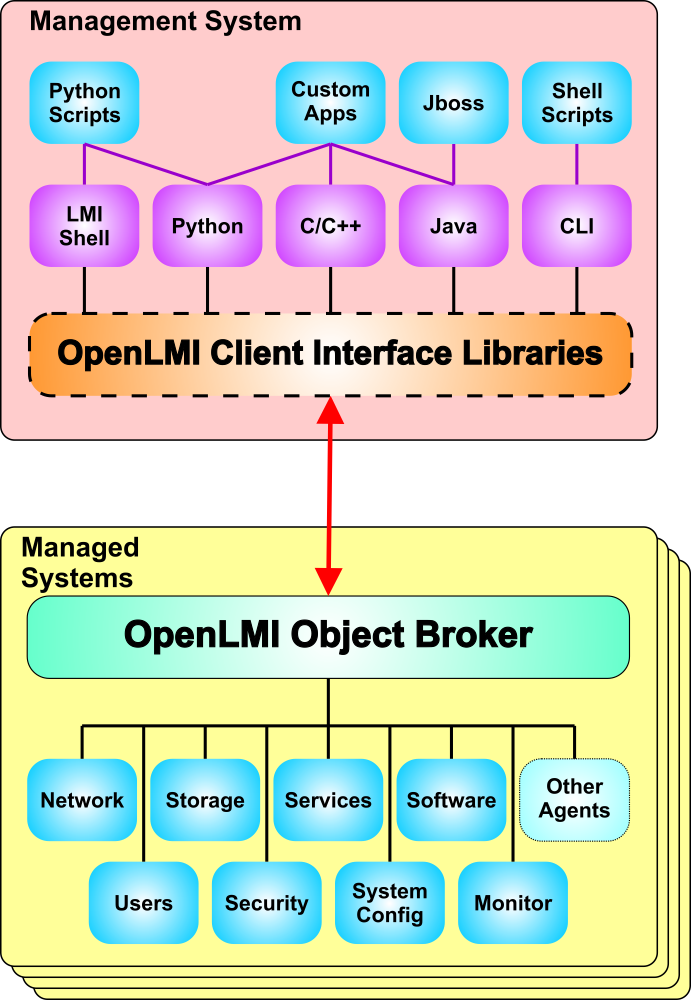
The full process for using OpenLMI:

  • The OpenPegasus CIMOM is installed on the managed system and started.
  • The desired set of OpenLMI Agents are installed on the managed system
  • An OpenLMI client and set of scripts are installed on the Management System
  • A system administrator then uses OpenLMI to perform the desired management tasks.

Note: all of this can be installed on a single system, thus allowing OpenLMI to manage a system locally.

OpenLMI Architecture

Posted in System Management | Leave a comment

OpenLMI Client Interfaces

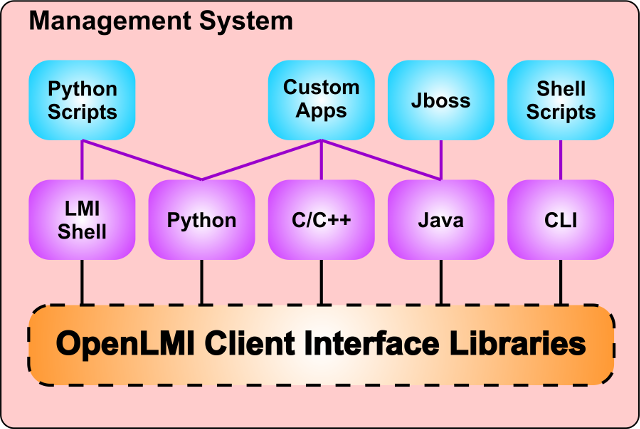
The primary interface to the CIMOM is a CIM-XML over https protocol implementing the WBEM (Web Based Enterprise Management) specification. WBEM can be use directly, but is normally accessed through language specific client libraries that make it much easier to use by abstracting the details of working directly with XML.

Ech language binding provides a native object interface for that language which directly manipulates the underlying OpenLMI objects. In other words, you work directly with Python objects in Python, Java objects in Java, etc.

OpenLMI includes client libraries for C/C++, Java and Python. Each client library provides access to the same underlying low level interface, thus allowing access to the full capabilities of OpenLMI .

Much of the work in the OpenLMI project uses Python as the client language. LMIshell has been developed to further simplify the development and use of Python based scripts for management functions. LMIshell simplifies repetitive operations such as system name/username/password, which is required to execute commands, provides command completion, and provides a framework for using scripts.

Native Java clients are fully supported. As an example, the JBoss Operations Network (JON) team has developed a module that uses OpenLMI agents instead of JON agents – this allows JON to function without installing any JON agents on the managed system.

OpenLMI Client Interfaces

Posted in System Management | Leave a comment