OpenLMI on YouTube

For your entertainment and amusement, Russell Doty and Stephen Gallagher have done a reprise of their Red Hat Summit presentation on OpenLMI and posted it to YouTube.

These videos answer some of the most common questions we hear about OpenLMI:

  • Why are you doing this?
  • What does it do for me?
  • How do I use it?
  • How does it fit with the rest of the system?

Four videos are available on the TechPonder channel:

Intro to OpenLMI Part 1

Intro to OpenLMI Part 2: Architecture

Intro to OpenLMI Part 3: Examples

Intro to OpenLMI Part 4: Elephants and Conclusions

Posted in System Management | Leave a comment

OpenLMI: HWInfo Working as Intended on Virtual Machine

I was recently told that someone had installed OpenLMI and it wasn’t working. They ran the hwinfo command to test the installation and it wasn’t reporting the correct information – most of the information was reported as “not specified” or “N/A”.

It turns out that they had installed OpenLMI in a virtual machine – and that most of the hardware information was, in fact, not available.

In a virtual machine:

lmi> hwinfo
Hostname:         localhost.localdomain

Chassis Type:     Other
Manufacturer:     Bochs
Model:            Not Specified (Bochs)
Serial Number:    Not Specified
Asset Tag:        0
Virtual Machine:  N/A

Motherboard info: N/A

CPU:              Not Specified
Topology:         1 cpu(s), 1 core(s), 1 thread(s)
Max Freq:         2000 MHz
Arch:             x86_64

Memory:           1.0 GB
Modules:          1.0 GB, RAM (DIMM), Not Specified
Slots:            1 used, N/A total
lmi>

For the physical system this VM was running on:

lmi> hwinfo
Hostname:        testbeda

Chassis Type:    Desktop
Manufacturer:    Gigabyte Technology Co., Ltd.
Model:           GA-MA78GM-S2H
Serial Number:   Not Specified
Asset Tag:       0
Virtual Machine: N/A

Motherboard:     GA-MA78GM-S2H
Manufacturer:    Gigabyte Technology Co., Ltd.

CPU:             AMD Phenom(tm) 9550 Quad-Core Processor
Topology:        1 cpu(s), 1 core(s), 1 thread(s)
Max Freq:        3000 MHz
Arch:            x86_64

Memory:          4.0 GB
Modules:         2.0 GB, 800 MHz, None, Bank0/1
2.0 GB, 800 MHz, None, Bank2/3
Slots:           2 used, 4 total
lmi>

There is much more information available from the physical system. The only things missing are the asset tag and the serial number, which I haven’t assigned for this system.

The lesson here: you can use the hwinfo command on a virtual machine, but you won’t get much useful information. The VM should not be able to get this information – if it can, there is leakage between the physical and virtual systems.

Posted in System Management | Leave a comment

Operational Integrity

The previous article looked at application and system integrity – let’s now look at the next level of integrity.

Introducing Operational Integrity

Let’s take the next step in integrity and look at the integrity of running systems over the life of an application service – operational integrity.

So far we have talked about applications as software. An application service is looking at using the application. Instead of thinking of it as software, we look at it from a user perspective as a set of capabilities that can be applied to business problems. An application service is the user interacting with the software, data, hardware and network infrastructure, storage, and everything required to allow a user to effectively use the application.

As an example of the difference between application and application service, consider a user of an MRP application running in a remote datacenter when a local router fails. In this case, the application is still running – however, the application service is no longer available to the user. The user doesn’t care why they can’t access the application or that other people are still running; all that matters is that the application service is not available to them!

Operational Integrity has three main components: Availability of application services, integrity of application services, and operations management.

Availability of Application Services

The first element is that the user can access the application services – that they have access to the applications and data and can use them to perform business tasks. Availibility also includes performance – a system that takes a minute to respond to user input instead of a fraction of a second will destroy productivity.

Thus, any definition of availability must include a response time metric. It is worth noting that, from a user perspective, the only truly acceptable response time is zero… Studies have shown increases in user productivity from reductions in response time, even when the response time goes below a tenth of a second.

Integrity of Application Services

Integrity of application services means that you can trust the results and that information is not compromised – either by denying access to people who should have access or by allowing access to people who shouldn’t.

Integrity of application services also includes resilience – maintaining correct operation even in the presence of attacks, system failures, or human error. Experience shows that human error tends to be the greatest challenge…

Operations Management

Operations management means maintaining the quality and integrity of application services over the life of the application. Basically, this means “install once, run for years”.

Once an application is installed, people start using it. Then more people start using it, and it slows down. Ongoing system monitoring and tuning is required. More processing power, memory and storage have to be added. The application – in fact the entire infrastructure – have to be patched for security issues and bugs. Software upgrades come out and must be installed. An enterprise application may have a life of 10-15 years – or longer! Hardware must be upgraded and replaced. New technologies must be incorporated, such as cloud computing or SSD based storage. New versions of the software come out, with new features, new requirements, and new bugs. New modules become available. The application must be integrated with other applications. Problems must be solved. Backups must be done. People must be trained.

All in all, maintaining and managing an application service over a 10-15 year lifespan is a much larger job than simply installing an application and checking initial integrity.

Next: Threats

Posted in Security | Leave a comment

Application and System Integrity

The previous article looked at user needs, which include the integrity of the applications and systems they are using.

We have defined integrity as one of the three pillars of IT. Now let’s define what we mean by application and system integrity:

  • The application returns the expected results.
  • Applications and data are available to authorized users.
    • Access and modification based on authorization.
  • Applications and data are not available to unauthorized users.
    • Access and modification prevented.
  • Systems and applications have not be modified in an unapproved way.
    • All modifications and attempts are recorded and reported.
  • Systems and applications can be verified and validated.
  • The system is resilient.

An interesting list – we need to break it down in more detail:

The application returns the expected results.

This is really the core of everything. If we can’t rely on the application to return the expected results then nothing else matters. Note that we aren’t saying “correct results” – there may be a variety of reasons for a system to return “incorrect results”, such as rule or procedure changes, logic errors, or even using work-arounds to force a system to do what is desired. Expected results means that they system is behaving predictably.

Applications and data are available to authorized users.

Another key element of system integrity is that authorized users can always get to their applications and data.

Access and modification based on authorization.

A key part of integrity – as well as security – is that users must be authorized to access and modify data. This includes the initial setup of access controls as well as maintenance over time. For example, if a user who has access to 20 different applications leaves the company, how are the systems updated? In general, a domain based authorization and authentication approach such as Red Hat Identity Manager or Microsoft Active Directory is strongly recommended.

Applications and data are not available to unauthorized users.

Giving access to everyone is often easy. Restricting access to only the people who are authorized to have access can be more difficult. To maintain system integrity, unauthorized users must not have access to data or applications.

Unauthorized Access and modification prevented.

The system must prevent unauthorized access to information and especially must prevent unauthorized modification of information. Doing this involves work in multiple areas, including technology, configuration, infrastructure, and policies and procedures.

Managing access to applications and data typically involves authentication and access control – often a combination of individual user access and Role Based Access Controls (RBAC).

Systems and applications have not been modified in an unapproved way.

Now we’re clearly getting into the domain of security. There are two things to keep in mind here: First, systems must be maintained. It is not acceptable to allow systems to “just work” – they must be actively maintained and monitored. Second, you must ensure that no unauthorized or unapproved modifications to the system occur.

All modifications and attempts are recorded and reported.

Key for both operations management and security is that all attempts to change a system must be noticed, recorded and reported. It is vital to track all changes made to a system.

Systems and applications can be verified and validated.

It isn’t enough for a system to work – you must be able to determine if the system has the correct software installed, that the software is properly configured, that the software is at the proper revision level, and that the software and configurations have not been modified.

Modifications can occur in multiple ways. A virus can infect a program. A hardware failure can corrupt the software, often in unusual ways. A patch can be applied incorrectly. No matter how changes occur, you must be able to verify that the software installed on the system is correct down to the bit level.

The system is resilient.

Resiliency is interesting. It simply means that the system continues function correctly in the face of degradation. You may see reductions in performance or the loss of some features, but the core capabilities of the system that generate business value must be available and produce the expected results.

System resiliency can be achieved in many ways. In future articles we will explore a variety of threats to a system and ways they system can continue to function. These threats range from hackers to hardware failure, natural disasters to user error – and even the actions of management!

Next: Operational Integrity

Posted in Security | Leave a comment

User Needs

In the last post we postulated that business value is created by users running applications which provide value added transformations of data. Users need three things from applications:

  1. Availability
  2. Performance
  3. Integrity

Of course, applications depend on the entire IT infrastructure.

Let’s look at these in more detail.

Availability means that the user can use the application when they need to – that the application, data, and IT infrastructure work together to allow the user to generate business value.

Performance means that the application has an acceptable response time to user requests. “Acceptable response time” depends on the context. For a large simulation job, multiple hours may be entirely acceptable. For many interactive operations, instantaneous is acceptable. For example, when entering data into a form, there should be no delay in echoing user input and in moving from one field to the next. In general, performance needs to be at a level where the user is productive and not frustrated with the system.

Integrity can have multiple meanings. In fact, integrity deserves a post of its own.

Next: Application and System Integrity

Posted in Security | 2 Comments

Creating Business Value

The previous article started a discussion of security.

Let’s take a look at the bigger picture, starting with a somewhat philosophical perspective: Why do companies have computers? Why do they have IT?

As a starting point, companies are looking for business value. Business value can be defined as quantifiable ways to make money or save money. Systems need to be judged on their ability to produce business value.

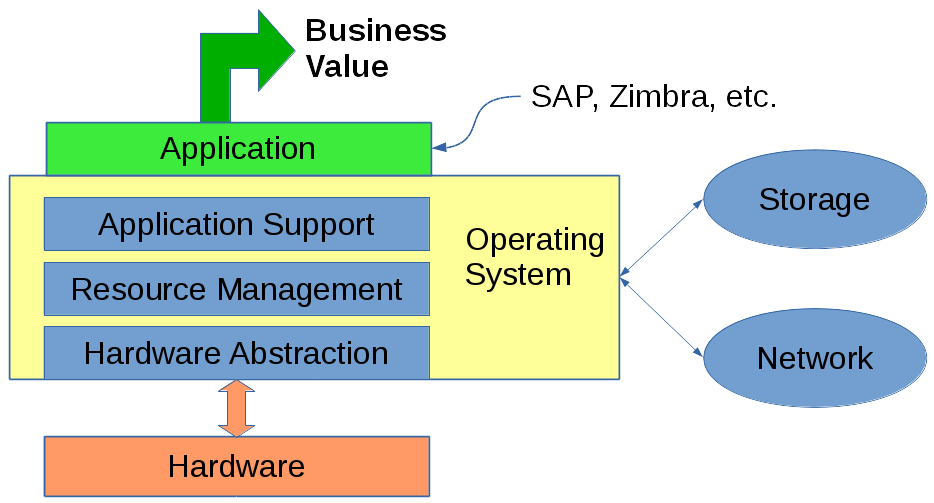
Perhaps surprisingly, computers have no inherent business value. Computers may be part of a system that generates business value, but by themselves they are just a tool.

Consider an ERP system – by itself it has no business value. The value of an ERP system comes from having the right materials at the right place at the right time to build and ship products. The value of an ERP system comes from having accurate cost data that allows setting prices that are profitable yet competitive.

Similarly, email has no inherent value. (Many people will agree with this assertion!) The business value of email comes from having the right information available to the right person at the right time, enabling effective communication between people, and providing an archive of business information. As an added benefit, email provides an audit trail and often provides an explanation and context for decisions.

Business Value

I propose that the generation of business value through IT has three components:

  1. People performing value added tasks.
  2. The information that is needed to support these tasks.
  3. Applications that apply value adding transformations to this information and make it available to users

Computers run the applications and host the data that is used by people to create business value. The sole reason for IT is to support the applications and data and make them available to users.

What is the connection to security? The corollary to this view is that anything that interferes with a users ability to use applications and access data to generate business value is a problem. In too many cases security is focused on preventing threats, even at the cost of impacting the creation of business value. We will look at several different ways to approach security while balancing security concerns with business issues.

Next: User Needs

Posted in Security | 4 Comments

Security

Security means keeping the Bad Guys out, right? Locking down the system so that it is difficult to use and turning on SELinux. And forcing users to comply with security policies they don’t understand and which interfere with their ability to get their job done.

And, of course, defense in depth – which is often a code phrase for turning on every feature of the system related to security. After all, “you can’t be too careful!”

All this may be just a bit narrowly focused…

I’d like to explore a slightly different perspective on security – one that looks at it from a business and user perspective and which takes a holistic view of security as one of many threats to system integrity. Done properly, security is simply one part of keeping the business running.

Over the next several posts we will explore different aspects of security – starting with asking the question “why do we even have IT?”

We will be exploring different aspects of security and welcome feedback and suggestions.

Next: Creating Business Value

Posted in Security | 4 Comments

Red Hat Summit

I’m just back from Red Hat Summit in San Francisco. The event was well organized and had a great turnout.

We showed up early to check out the room where we were giving our OpenLMI presentation and to do a last dry run. (Nervous? Me? Don’t be ridiculous!) The room was huge, holding well over 200 people. Fine, plenty of extra capacity.

Then things started getting strange. A half hour before the presentation was due to start, we had over a dozen people in the room. OK, let’s talk to them and see if they are in the right place… Yes, they were. And they had questions and gave us feedback on what they wanted to hear. Well, there goes the dry run. But this was better!

By the time the presentation started the room was packed – in fact, standing room only! The presentation went well. Stephen Gallagher and I played the roles of an experienced SysAdmin and a junior SysAdmin exploring Linux system management and how OpenLMI could make life better. Much of the presentation involved showing actual LMIShell commands to perform a wide range of system management tasks – concluding with “OK, if OpenLMI is so great, can it make me a sandwich??”. The answer may be a bit surprising; ask me about it sometime.

We finished the presentation early to have time for questions – and we got great questions and ran out of time before running out of questions. We then talked to people until we were chased out of the room for the next presentation.

We had to run to the demo pod for our OpenLMI demo. We had put together a demo showing LMIShell configuring storage and networks – by an amazing coincidence, the same tasks we had shown in the presentation… We had a steady stream of people stopping by, many with solid questions.

If anyone reading this was at Red Hat Summit, thank you! We welcome any questions, comments, or suggestions you might have. And please try OpenLMI!

Posted in System Management | Leave a comment

OpenLMI Developer Projects

“How can I get started with OpenLMI?”

From one perspective there is an easy answer – start using LMIShell scripts and lmi commands to manage systems.

At the other extreme you can write a complete OpenLMI Provider.

With the availablity of LMIShell there is another answer – to develop a program or script that builds on the OpenLMI infrastructure to do useful work. Developing client tools in LMIShell provides an easy entry point to learning OpenLMI and understanding how to apply it to more complex problems. Using Python or Java you can develop reasonably small programs that do interesting things. With the examples contained in the LMIshell scripts and the OpenLMI API documentation you have everything you need to learn by doing.

Experience has shown us that the greatest challenge in using OpenLMI is understanding the underlying object model and the low level API. LMIShell provides a task-oriented interface that is easier to learn and use. After starting with LMIShell you can look inside the LMIShell scripts and see how they work with the low level API. Starting from the top down, getting immediate results, and learning by doing makes OpenLMI much more approachable. Working with LMIShell and high level interfaces to accomplish useful tasks is a great help to using OpenLMI for system management and even for doing complex tasks such as developing OpenLMI Providers.

We have added some suggestions for interesting projects to the Sandbox page on the OpenLMI web site. These are interesting, useful projects that you might consider as a starting point. Most are designed to be implemented in Python on top of LMIShell However, if you prefer, there is nothing stopping you from implementing them in Java – or even “C” or C++! Some of them are very straightforward and some are a bit more complex. If nothing else, these might give you some ideas for your own project.

Speaking of which, if you have any ideas for interesting and useful project built on OpenLMI, please propose them!

Posted in System Management | Leave a comment

OpenLMI CLI Interface Now Supports Networking

The OpenLMI CLI now includes commands to configure networks.

lmi> help net

Networking service management.

Usage:

net device (–help | show [<device_name> …] | list [<device_name> …])

net setting (–help | <operation> [<args>…])

net activate <caption> [<device_name>]

net deactivate <caption> [<device_name>]

net enslave <master_caption> <device_name>

net address (–help | <operation> [<args>…])

net route (–help | <operation> [<args>…])

net dns (–help | <operation> [<args>…])

Commands:

device Display information about network devices.

setting Manage the network settings.

activate Activate setting on given network device.

deactivate Deactivate the setting.

enslave Create new slave setting.

address Manipulate the list of IP addresses on given setting.

route Manipulate the list of static routes on given setting.

dns Manipulate the list of DNS servers on given setting.

As you can see from the help command, you can determine what network devices are available, read and modify their configuration, and bring NICs up and down.

List network devices:

lmi> net device list

ElementName OperatingStatus MAC Address

em1 InService 3C:97:0E:4B:2E:53

lo NotAvailable 00:00:00:00:00:00

virbr0-nic NotAvailable 52:54:00:DF:BD:C4

wlp3s0 Dormant 60:67:20:C9:0B:DC

Get details on a network device:

lmi> net device show em1

Device em1:

Operating Status InService

MAC Address 3C:97:0E:4B:2E:53

IP Address 10.18.57.222/255.255.127.0

IP Address fe80::3e97:eff:fe4b:2e53/64

IP Address 2620:52:0:1238:3e97:eff:fe4b:2e53/64

Default Gateway 10.18.57.254

Default Gateway ::

Default Gateway ::

DNS Server 10.5.30.160

DNS Server 10.11.5.19

Active Setting System em1

Available Setting System em1

The LMI CLI commands for networking allow you to show the device settings, change device settings, activate and deactivate a network device, and add or remove devices to a set of  bonded or bridged devices.

Posted in System Management | Leave a comment